2012年12月3日 星期一

Ethical Hacking -- Proxy Hunter

Proxy Hunter is a proxy application that lets you scan for proxy servers.
Proxy Hunter is also a malware if it is unintentionally installed in your PC.

Proxy Hunter could be an danagerous tools if it is used by Hacker or Botnet, as those found (free) Proxy may be utilized as Zombie and could hide the Hacker away when Hacker lauch a DDoS to his/her target.

The reason to share Proxy Hunter info here is let people know how a Hacker can look for resource launching DDoS attack. We are not aiming at promoting Hacking as a habit.

As Proxy Hunter could be a tools for devils, it is not easy to Google search a valid download link. Here is the portal you could find it

URL: http://download.pchome.net/
filename: proxyht310b.zip


After installation, open it, and YOU MUST read the Warning.
 
Considering the damage that a Proxy Hunter could do, and some PC users may unintentionally installed with a Proxy Hunter, your PC's AV software will not recommend a Proxy Hunter. Click "Allow" only when you are sure what you are doing now.
 

Launch Proxy Hutner. Following the Step-by-Step tutorial : (in Chinese)
URL:  http://www.360doc.com/content/09/1204/12/261866_10342617.shtml

Or this simple tutorial (in English):
http://www.proxysecurity.com/proxy-hunter.php


The searching may need several hours for a Class B.   ......to be continued....

2012年11月27日 星期二

Intrusion Prevention Best Practice - IPS Placement

By deploying IPS, organizations are able to identify, classify, and stop malicious traffic, including worms, spyware / adware, network viruses, and application abuse before they affect business continuity.

Internet Border & DMZ

The most common place to insert IPS is at an organizations' internet border(s) and DMZ(s). The following represents some of the options for placement of an IPS to protect an internet border and DMZ.

IPS Outside of Firewall

This architecture places the IPS outside of the internet firewall.This architecture was one of the first proposed when IPS came to market, but is not very common for today's environments.

Pros:
  • Early indication of reconnaissance/scanning activities
  • Requires less interfaces to inspect traffic sourced/destined to the DMZ and Internal Network
Cons:
  • Destination/Victims addresses will be NATed, causing research to determine which device inside the organization is being attacked. 
  • Source/Attacker addresses from the inside of the organization will be NATed causing additional research to track down the source of any malicious traffic coming from the organization.
  • Inspection of traffic that will be dropped by the firewall will create excess false positives.
  • No visibility of insider traffic destined to dmz
Figure 1 - IPS Placed Outside of the Firewall


IPS Inside of Firewall for DMZ and Internal Network

This architecture places the IPS inside of the internet firewall protecting both the Internal Network and DMZ segments.

Pros:
  • Only inspects traffic that the firewall allows into the network. (Minimizing False Positives)
  • Events will include real IP addresses and not NATed IPs.
  • Differentiate traffic to/from DMZ and Internal Segments.
Cons:
  • Requires 2 IPSs or an IPS with enough interfaces to protect both segments.
  • Traffic between internal and DMZ will be inspected twice.
Figure 2 - IPS Placed Inside the Firewall

IPS Software or Module in the Firewall

With the growing popularity of Unified Threat Management (UTM), this architecture is becoming extremely common. It places the IPS functionality inside the internet firewall protecting both the Internal Network and DMZ segments without a separate appliance.

Pros:
  • No additional appliance required, saving rack space and energy.
  • Events will include real IP addresses and not NATed IPs.
  • Differentiate traffic to/from DMZ and Internal Segments.
Cons:
  • Some manufacturers limit the throughput of integrated IPS (just be sure that the integrated IPS will support the required bandwidth)
Figure 3 - IPS Software or Module in the Firewall

2012年11月26日 星期一

Firewalls in the Data Center: Main Strategies and Metrics

For those who are involved in "Sizing" a "Next Generation Firewall", I would like to share with you this paper:

Firewalls in the Data Center: Main Strategies and Metrics
Joel Snyder, PhD
Senior Partner, Opus One

Abtract:
Measuring performance in networks has usually involved looking at one number: throughput. Since the first days of switches and routers, organizations have added up the performance they need, compared it to a total on a manufacturer’s data sheet, and used those values to decide whether or not they had the right hardware.

Unfortunately for security and network practitioners, the same basic metric of throughput cannot be used to
evaluate firewall performance.
Because a security appliance actively participates in connections from Layer 2 up to Layer 7, you cannot simply look at bits-per-second throughput to predict how a firewall will behave in the data center.

In this document, you will learn key metrics you should use to evaluate firewall performance in the data center and why raw throughput is almost never the most important performance metric to use in your planning. Selecting a firewall does not mean simply picking the fastest firewall, but the one that is designed to handle the rapidly evolving,
network-intensive application environment of the data center.


http://www.cisco.com/en/US/prod/collateral/vpndevc/ps6032/ps6094/ps6120/Opus_One_Layout-928.pdf

2012年8月27日 星期一

"Un-intentional " DDoS Attack - the 40th MISS HONG KONG Beauty Contest

"Un-intentional " DDoS Attack - the 40th MISS HONG KONG Beauty Contest

In the final round of 40th Miss Hong Kong Beauty Contest, the online voting system is down due to over-crowded oublics, who are going to vote for their preferred candidates. As a backup plan, the final results is generated base on score from judges instead. This upsets quite a lot of online voters of the contest.


http://www.singtao.com/yesterday/ent/0827fo01.html

2012年8月19日 星期日

Blue Coat - Positioning of SWG vs FW, UTM, etc

"Who is BlueCoat?" - this is a wonderful powerpoint explaining the why BlueCoat solution (or BlueCoat-kind of solution) is required.

Blue Coat positioning Web Security vs. Next Gen Firewalls, UTMs & IPS :
   https://partners.bluecoat.com (you may need a partner login)


2012年8月17日 星期五

Blue Coat - Secure Web Gateway

Blue Coat Web Threat Report -- published by Broadband-Testing, UK :
   http://www.bluecoat.com/sites/default/files/documents/files/Broadband_Web_Threat_Test_Report.1.pdf

Blue Coat positioning Web Security vs. Next Gen Firewalls, UTMs & IPS :
   https://partners.bluecoat.com (you may need a partner login)


2012年8月9日 星期四

Secure and Manage Skype Usage

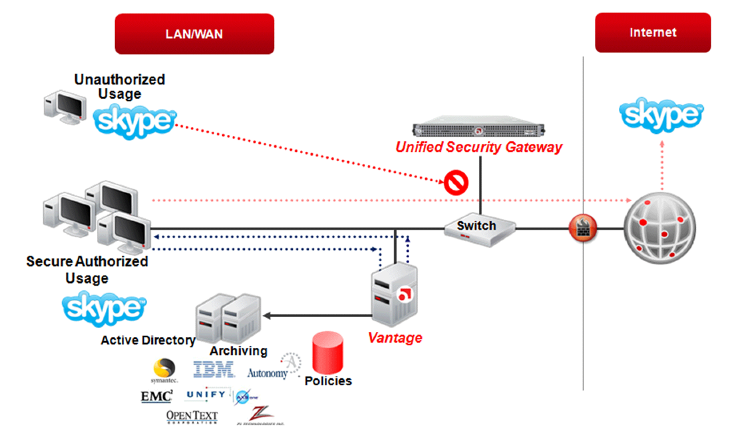
Skype Security and Management  Solution - "Actiance Advantage"


Actiance provides a comprehensive approach to managing and securing the use of Skype and other real-time communication applications within the enterprise. Visibility at the gateway is the first step in gaining control over Skype usage. Actiance’s Unified Security Gateway (USG) provides IT with complete visibility
into unauthorized Skype traffic on the network. It is purpose-built for the security of real-time  communications. Once visibility is obtained, Actiance’s Vantage enables the enforcement of Skype usage policies at the client and blocks any malicious URLs coming in over Skype chat sessions. This robust combination allows IT managers to set and enforce policies that ensure Skype traffic on their network is secure and meets compliance requirements.

Datasheet: http://www01.actiance.com/media/12574/Actiance-Datasheet-Skype.pdf
Company Website:  http//www.actiance.com
Actiance Blog: http://blog.actiance.com/